English in Use 5
Reading & Listening
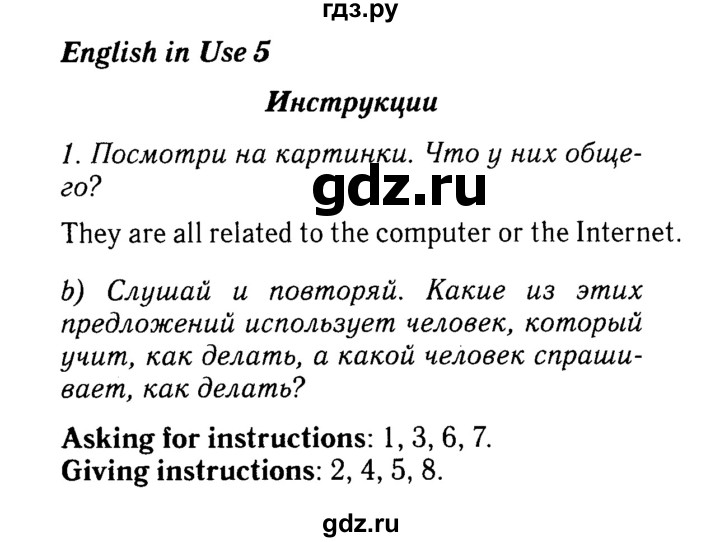
1. a) Look at the pictures. What do they have in common?
b) Listen and repeat. Which of these sentences are used by: a person asking for instructions? a person giving instructions?
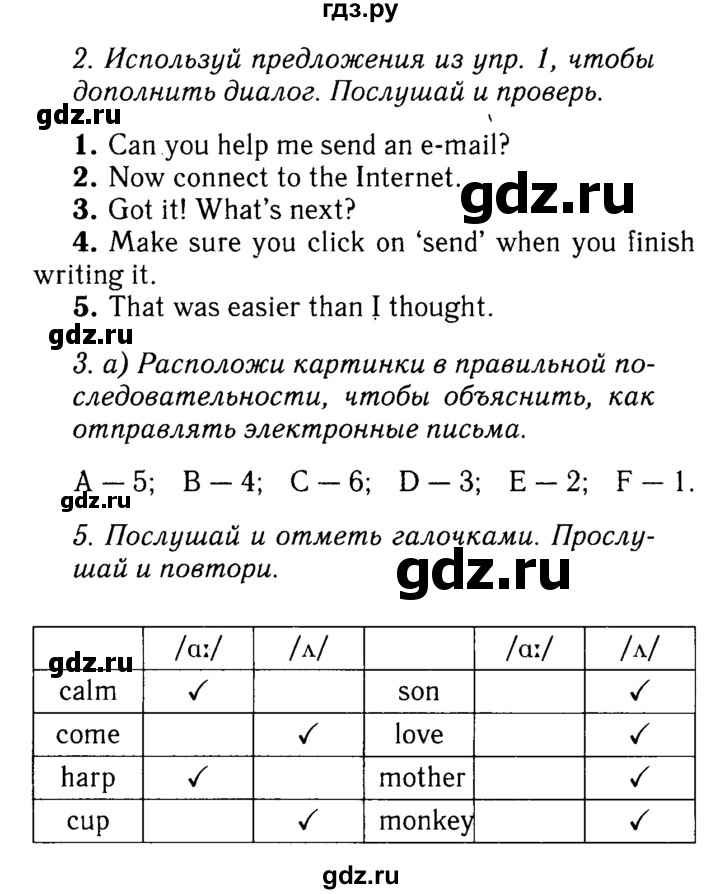
2. Use sentences from Ex. 1b to complete the dialogue. Listen and check.
Cathy: Mark, do you have a minute?
Mark: Sure, what do you need?
Cathy: 1) .... .
Mark: No problem, Cathy. First of all, turn on your computer.
Cathy: All right.
Mark: 2) .... .
Then access your email account.
Cathy: 3) .... .
Mark: Click on 'Create a message'and type it in. 4) .... .
Cathy: Anything else, Mark?
Mark: Oh, yes. Include the email address of the person you are sending it to!
Cathy: Thanks, Mark. 5 ) .... .
3. a) Put the pictures in the correct order to show how to send an email.
b) Use the pictures to help you act out a dialogue similar to the one in Ex. 2.
4. Portfolio: Use the instructions below to act out a dialogue about sending an SMS. Use Ex. 2 as a model. Record yourselves.
1 switch on your mobile phone
2 go to the menu on your phone
3 choose MESSAGES
4 select CREATE MESSAGE
5 write your sms
G select SEND
7 hey in the mobile number of the person you're sending the teHt to and choose SEND again
Pronunciation
5. Copy the table.
Listen and tick (✓). Listen and repeat. Think of two more words with the same sounds.
ИИ-решебник / страница / 52
Ответ подготовлен нейросетью и может содержать ошибки
Объяснение и пошаговое решение
### Ответ к заданиям
#### Exercise 1
**a)** **Ответ:** They are all related to using a computer and sending an e-mail (all pictures show the steps of working on a computer / sending an e-mail).
**b)**
* **A person asking for instructions (Человек, который просит инструкцию):**
* *Can you help me send an e-mail?* (Ты можешь помочь мне отправить электронное письмо?)
* *Got it! What's next?* (Понятно! Что дальше?)
* *Sorry, can you say that again?* (Извини, можешь повторить?)
* *That was easier than I thought.* (Это было проще, чем я думал / реакция ученика)
* **A person giving instructions (Человек, который дает инструкцию):**
* *This is how you can send an e-mail.* (Вот как ты можешь отправить электронное письмо.)
* *Now connect to the Internet.* (Теперь подключись к Интернету.)
* *Make sure you click on 'send' when you finish writing.* (Обязательно нажми «отправить», когда закончишь писать.)
* *You may also select an e-mail address from your address book.* (Ты также можешь выбрать адрес из адресной книги.)
---
#### Exercise 2
1) **Can you help me send an e-mail?**
2) **Now connect to the Internet.**
3) **Got it! What's next?**
4) **Make sure you click on 'send' when you finish writing.**
5) **That was easier than I thought.**
---
#### Exercise 3
**a)** **Правильный порядок действий по картинкам учебника:**
1. **D** — Turn on your computer *(Включить компьютер)*
2. **B** — Connect to the Internet *(Подключиться к Интернету)*
3. **A** — Access your e-mail account *(Войти в почтовый ящик)*
4. **E** — Click on 'Create a message' *(Нажать «Создать сообщение»)*
5. **C** — Type in the text and address *(Напечатать текст и адрес)*
6. **F** — Click on 'Send' *(Нажать «Отправить»)*
**b)** **Пример диалога:**
* **A:** *Can you show me how to send an e-mail, please?*
* **B:** *Sure. First of all, turn on your computer and connect to the Internet.*
* **A:** *Got it! What's next?*
* **B:** *Access your e-mail account and click on 'Create a message'.*
* **A:** *All right. What do I do now?*
* **B:** *Type your message, enter the recipient's address and click 'Send'.*
* **A:** *Thanks! That was easier than I thought.*
---
#### Exercise 4 (Portfolio)
**Диалог «Как отправить SMS-сообщение»:**
* **Ann:** *Ben, do you have a minute? Can you help me send an SMS?*
* **Ben:** *No problem! First of all, switch on your mobile phone.*
* **Ann:** *All right, it’s on.*
* **Ben:** *Now go to the menu on your phone and choose MESSAGES.*
* **Ann:** *Got it! What’s next?*
* **Ben:** *Select CREATE MESSAGE and write your SMS.*
* **Ann:** *Done. Anything else?*
* **Ben:** *Select SEND, key in the mobile number of the person you're sending the text to and choose SEND again.*
* **Ann:** *Thanks, Ben! That was easier than I thought.*
---
#### Exercise 5
**Таблица распределения звуков:**
| Слово | /ɑː/ (долгий звук «а») | /ʌ/ (краткий звук «а») |
| :--- | :---: | :---: |
| **calm** | ✓ | |
| **come** | | ✓ |
| **task** | ✓ | |
| **cup** | | ✓ |
| **son** | | ✓ |
| **love** | | ✓ |
| **mother** | | ✓ |
| **monkey** | | ✓ |
* **Дополнительные примеры слов (More words):**
* Для звука **/ɑː/**: *father, party, car, dark, star, fast.*
* Для звука **/ʌ/**: *brother, duck, sun, run, bus, funny.*
---
### Пояснение к выполнению
1. **Упражнение 1b:** Фразы-просьбы обычно содержат вопросы (*Can you...?*, *What's next?*) или переспросы (*Sorry...?*). Фразы-инструкции содержат повелительное наклонение (*connect*, *make sure*) или объяснение процесса (*This is how...*).
2. **Упражнение 2:** При заполнении диалога соблюдается логика действий:
* Кэти просит помочь (1);
* Марк говорит следующий шаг после включения ПК — подключиться к сети (2);
* Кэти подтверждает понимание и спрашивает следующий шаг (3);
* Марк объясняет финальный шаг отправки (4);
* Кэти благодарит и подводит итог, что всё оказалось не так трудно (5).
3. **Упражнение 5:**
* Звук **/ɑː/** — глубокий, долгий открытый звук (буква *a* перед согласными *lm, sk, th, r*).
* Звук **/ʌ/** — краткий, образуется в середине ротовой полости при чтении букв *u* и *o* в закрытом слоге в словах-исключениях (*love, mother, come, monkey*).



 Премиум


 ИИ-решебник / страница / 52